Dear parent,
You found a math game your kindergartner loves. Ten minutes in, a video ad for a different game takes over the screen, and now they want that one instead. We have been there too. It is why we built Number Beasts with no ads, no in-app purchases, no accounts and no tracking.
Below are the facts behind the three myths you just flipped, a quick way to check any app before you hand over the phone, and an honest look at whether our game suits a five-year-old. Some of it will point you elsewhere. That is fine.
The Honest Little Apps studio
Are there kindergarten math games without ads?
Yes, but you usually have to check, because most free ones carry ads. Look for "no ads" in the App Store description, then read the in-app purchase list and privacy label. Number Beasts: Bond Lab is one example: its listing says no ads, no in-app purchases, no accounts and full offline play.
The myths come from a real study. Researchers at the University of Michigan reviewed 135 apps marketed to or played by children 5 and under, and reported in the Journal of Developmental & Behavioral Pediatrics that 95% contained at least one type of advertising. In Michigan Medicine's 2018 summary, 100% of free apps had ads, pop-up video ads appeared in more than half of free apps, and 41% of free apps offered in-app purchases. Some used characters to push those purchases.
For little kids, "free" usually means "paid for by ads". Check before you hand it over.
The 60-second ad check
- Read the first lines of the description. Ad-free apps usually say so plainly. Silence is not a yes.
- Look for "In-App Purchases" next to the Get button, then scroll to the list of items and prices.
- Open App Privacy. If you see "Data Used to Track You", the app shares data with other companies' apps or sites.
- Check the age rating details. Apple's age rating questionnaire asks developers whether the app contains advertising.
- Play it yourself for five minutes in airplane mode, then online. Ads that need a connection show up fast.
The privacy label and the age rating details are reported by the developer, so step 5 is your final check.
How Number Beasts works in 3 steps
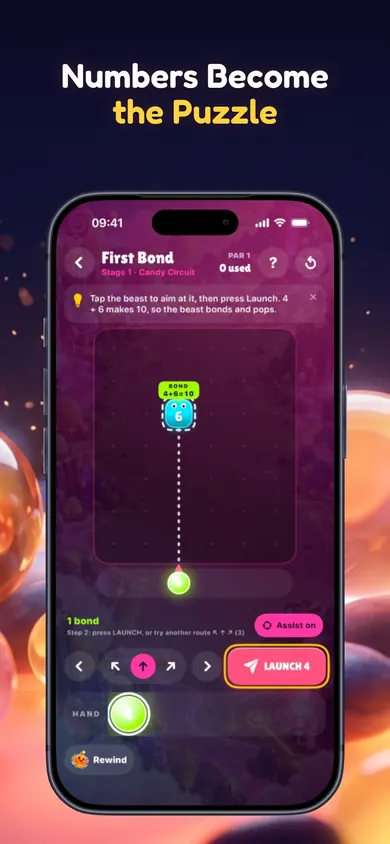
The kindergarten skill underneath it is exact: the Common Core standard K.OA.A.4 asks children, "For any number from 1 to 9, find the number that makes 10 when added to the given number." Number Beasts turns that into a launch.
- Tap the beast you want to hit. The launcher lines up the shot.
- Read the sum before you launch. With aim assist on, the path and the exact sum appear first, like BOND 4+6=10.
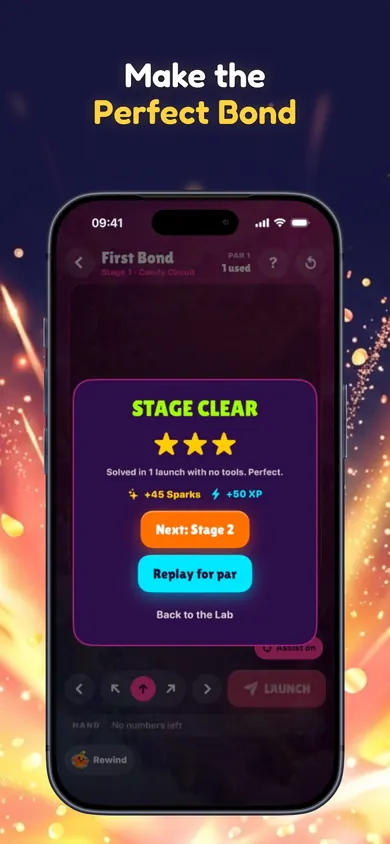
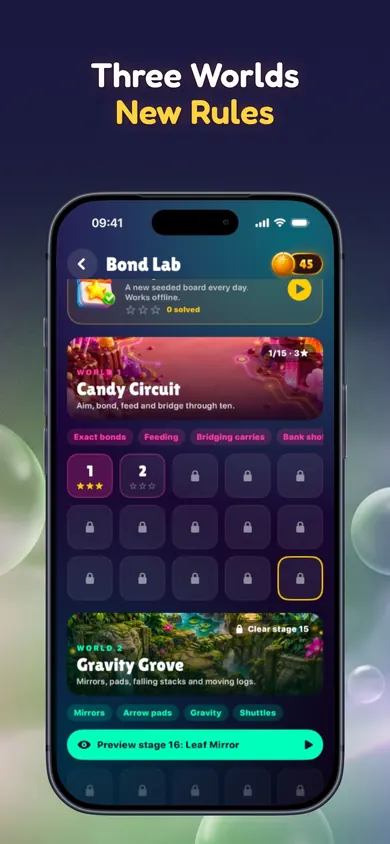
- Clear the stage. Nothing is random, and every one of the 45 stages is checked by a solver, so all are winnable.
Every shot is a number sentence your child can read before it happens.
What your child will see
Comfort settings include large, readable numbers, two-step tap-to-aim with route buttons, VoiceOver labels on every beast, Reduce Motion support and separate music and sound controls.
What a 10-minute session looks like
Sit next to your child for the first few. Stage 1 asks for one shot: a 4 into a 6. They tap the beast, see BOND 4+6=10, press Launch, and it pops. By stage three they are choosing which beast to hit first. When they get stuck, Bloop rewinds a launch; any helper tool caps the stage at two stars, which is a gentle nudge to try again without help. Then put the phone away. The game saves everything on the device and works offline, so it is there tomorrow.
Short, side by side, and ending on a win: that is the habit worth building.
Questions parents ask
Is Number Beasts really free with no ads?
Is Number Beasts right for kindergarten?
Does my child need to read?
Does it need Wi-Fi?
What if we want something faster?
Honest limits, and who should pick something else
- It teaches one big idea. Number Beasts is about making 10 and carrying the rest. It does not cover shapes, measuring or counting past 20.
- It gets hard. Chaos Laboratory uses splitters and times converters. Expect your kindergartner to stay in the first world for a while.
- Children still counting to 10 may do better with real objects first: ten crackers, a ten-frame, fingers.
- Families who want a full curriculum with levels for every skill should look at a broad math program instead.
Our design decision: one rule, explored deeply, with nothing in the way. No ads and no shop means your child's ten minutes go to the numbers.
Make ten. Carry the rest.
Make it a habit with Number Beasts: one Daily Lab a day, no ads, no purchases.

More from Pocket Puzzle Arcade
- How to teach number bonds to 10Number bonds to 10 not sticking? Tick a 5-step checklist to find where to start, try no-prep games, and play a make-10 demo with your child.
- Winter break math practice for first gradeWinter break math practice for first grade: enter your break dates, get a day-by-day plan of 10-minute make-ten games, mostly screen-free.
- Number bonds to 20 gamesNumber bonds to 20 games for second grade: play a make-20 beast demo, collect all 9 pairs, and get plain answers to the questions parents ask.
- History games for middle schoolHistory games for middle school, compared from their own sites: Mission US, iCivics, Reading Like a Historian and PastRush. Scratch a real exhibit label.